

If you have already inserted and loaded Product and Availability Heureka Feed on first tab, you will need Pair Tags from your Heureka Feed to Brands that are on MALL.
If you don't already have Heureka XML feeds embedded in your partner portal, check out a separate article that deals with this topic.
Overview of Brands
It is necessary to have the brand in the feed for each product according to Heureka specifications. In the section Heureka Feed in the second tab you will find the Tags box, where you will see the following information:
- number of tags in the feed = shows the number of tags that are pulled from your Heureka Product Feed.
- number of paired tags = displays the number of tags that are already paired with MALL tags from your XML feed, you can see an overview of these tags.
- number of unpaired marks = shows the number of tags that are in your XML feed and still waiting for your manual pairing, selecting "show" opens an automatic window where a separate pairing is done.

Pairing Brands
For correct listing of all products for sale on MALL, you need to have the brand in the Heureka XML feed for all products and also pair it properly in the MALL Partner Portal administration - this is what the brand matching is for.
In the Heureka Feed section on the tab Feed Status in the Tags box, Unpaired tags will be displayed. This is an automatic window where the tags themselves will be paired, as shown in the following image.
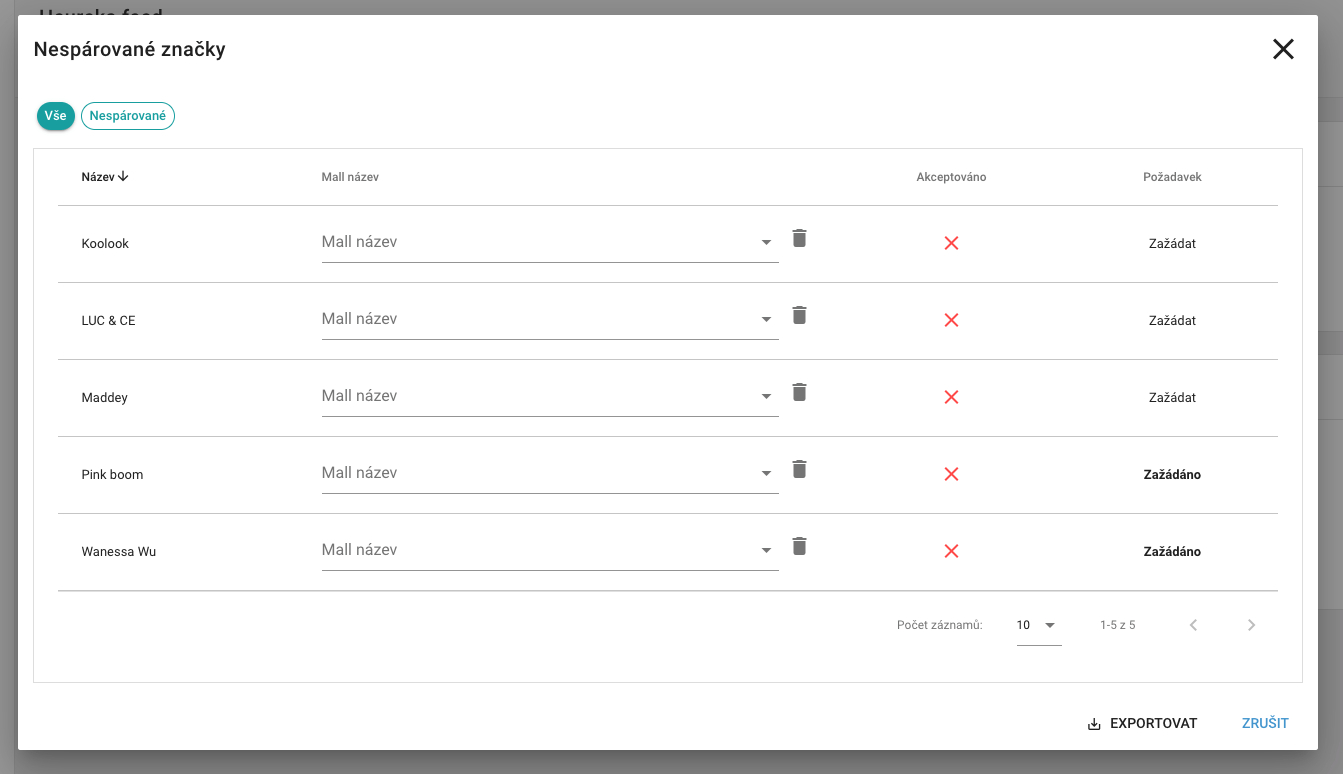
- The Name column lists the tags that are retrieved from your Heureka XML feed.
- In the Mall Name column, the brand name will be offered to you from the brand name picker.
- If you do not find an adequate tag in the list, click on the "Apply for tags", more detailed information about the founding of the brand can be found here.
- There is also an option to export the whole report to CSV.
Important: The tag is automatically assigned to the first position in the product name.
There can be only one Admin within the access accounts to your portal.
